Wednesday, April 30, 2014

Tip: IntelliJ IDEA : Do not want unlimited whitespace at the end of each line

File menu -> Settings -> Editor -> Virtual Space and uncheck 'Allow placement of caret after end of line'. 

Also uncheck the other options in the Virtual Space panel.

If you want to remove trailing whitespaces, you can do
File menu-->Settings --> Editor --> Strip Whitespaces on Save   to either "All" or "ModifiedLines".

Tuesday, January 07, 2014

Clean Up Root Partition on Fedora

If you have the following problems:
  • Root partition / is using 100% of allocated disk space
  • Root partition / is close to using 100% of allocated disk space

Then,

$>  sudo yum install bleachbit
$>   su - -c "bleachbit"

Use bleachbit to clean up unwanted files.

Tuesday, December 24, 2013

Copy Video on iPhone without iTunes

If you are in need of copying a home video on to your iPhone and you have lost the computer which has the original iTunes sync, do not despair.

VLC app on ios is there for the rescue.

Official Documentation: https://wiki.videolan.org/Documentation:IOS

Steps


  1. Temporarily turn off the lock feature of your iPhone. You can bring it back after the video upload.
  2. Download VLC player from the App Store. Ensure that the vendor is VideoLan.
  3. Ensure your iphone and computer are connected to the same WIFI.
  4. Open VLC app.
  5. On the top left hand corner, is the hat symbol. Click on hat.
  6. Go to Wiki Upload. Enable the server.  Note down the IP address it provides.
  7. Go to your browser and type in the IP address:  something starting with http:
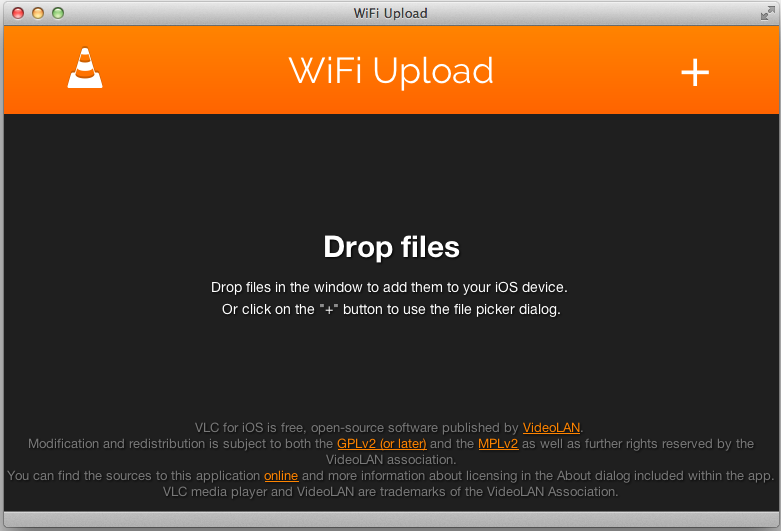
  8. You will see Fig 1
  9. Click upload files button and choose the video file.
  10. Once the file is uploaded, enjoy the home video. Remember VLC can play many formats : mp3, mp4, m4u etc.
  11. Remember to turn back the locking feature on your iphone.
  12. Fig1: Browser Interface